Best note-taking app for students in 2026
The right pick depends on whether you type, handwrite, or record lectures. Here is the honest table, with every free-tier limit read off the pricing page in August 2026.
Best note-taking app for students, compared honestly
It is week three, the lecture runs ninety minutes, and the slides move faster than your hand. One student next to you is thumbing an iPad with a pencil, another is typing into a laptop, and a third has a phone flat on the desk recording the whole thing. All three will pass, because each one picked the tool that fit how they work. The best note-taking app for students is not a single app; it is the one that matches how you capture, whether that is ink, keyboard, or voice.
Get that axis right and the shortlist picks itself. Get it wrong and you buy a handwriting app you never write in, or a wiki you never open twice.
This comparison sorts the field by capture mode, device, and the free-tier limits that actually bite mid-semester. Prices come from each vendor's own pricing page, read in August 2026, not from memory.
The verdict, by how you study
Read the one line that matches you and stop. The rest of the page is the evidence behind it.
- You want one hub for typed notes, tasks, and class wikis: Notion. The Plus plan is free for students who sign up with a school email address.
- You handwrite on an iPad with an Apple Pencil: GoodNotes at $11.99/year, or Notability at $15.99/year if you want audio recorded and synced to your ink.
- You want free, cross-platform, and no setup: Microsoft OneNote (free, runs everywhere), or Apple Notes if you live entirely on Apple hardware. Neither costs a cent.
- You want a knowledge base you own, in plain files: Obsidian. The app is free for personal use; you pay only if you add sync.
- You record online lectures on a Mac and want to dictate your own summaries, privately: talk2bud. It records the class call through your Mac's system audio with no bot joining in, keeps the recording disclosed rather than secret, and turns what you say into finished text inside the app you are already using.
No single app wins every row below, and any comparison that says otherwise is selling something.
How this comparison was built
The method is document review, not a lab. Each app's price, free-tier caps, and platform support were verified against the vendor's own pricing and support pages in August 2026, and cross-checked against public user reports on Hacker News. Where a claim could not be traced to a primary source, it was left out.
The criteria and weights, chosen for a student who captures in class and reviews before exams, run like this. Capture fit for your style carries the most, at 30 percent, because an app that does ink, typing, and voice all poorly helps nobody. The real free-tier limit is worth 20 percent, meaning what the plan actually caps rather than its headline price. Cross-device reach across phone, laptop, and tablet takes 15 percent, and so does yearly cost after any student discount. Lecture audio, the ability to record and jump back to the moment you missed, is 10 percent. Privacy and local access, whether your work sits on your own machine and whether recording announces itself instead of hiding, rounds out the final 10 percent.
Verified August 2026 against the sources linked throughout. Prices change; the date on this page is the promise that it was checked, and the review cycle reopens it every quarter.
The master table
Rows are apps; columns are the criteria that decide. Read down the column that matches your capture mode.
| App | Capture mode | Platforms | Free tier, real limit | Lecture audio | Yearly cost (student) | Local / offline |
|---|---|---|---|---|---|---|
| Notion | Type | Mac, Win, iOS, Android, web | 5 MB per file; blocks capped for 2+ members | No native record | $0 (Plus, school email) | Weak, cloud-first |
| OneNote | Type + ink | Mac, Win, iOS, Android, web | Effectively none for students | Records + transcribes (via M365) | $0 | Partial |
| Obsidian | Type (Markdown) | Mac, Win, iOS, Android, Linux | None on the app itself | No native record | $0, sync is $48/yr | Strong, plain files |
| GoodNotes | Ink | Apple, Android, Win, web | 3 notebooks, 20-min audio, 100 MB | 20 min on free tier | $11.99 (Essential) | Partial |
| Notability | Ink + audio | iOS, Android, web | 5 notes | Record + transcribe (Plus) | $15.99 (Plus) | Partial |
| Apple Notes | Type + light ink | Apple only | None | No | $0 | Strong on device |
| Otter.ai | Voice | Web, iOS, Android | 300 min/month | Transcribes, 90-min cap/session | ~$100 (Pro, annual) | No, cloud only |
| Evernote | Type | Mac, Win, iOS, Android, web | 50 notes, 1 device | No | Paid only, price rising | Weak |
| talk2bud | Voice (dictate + capture) | Mac (Apple Silicon) only | 10-day trial, no card | Captures online-lecture audio, no bot in the call, consent explicit | What talk2bud costs | Strong, Mac-native |
Three things the table makes plain. Notion is free for students but has no honest offline mode. The iPad handwriting apps are cheap but locked to a stylus workflow. talk2bud captures online lectures with the recording announced rather than hidden and runs only on a Mac in English, which is the whole point of the next section.
The nine note-taking apps for students, and where each breaks
Notion, the all-in-one hub
Notion is the default answer for the student who wants class notes, assignment tracking, and a course wiki in one place, and it hands the Plus tier to any student who verifies a school email (verified August 2026), including unlimited file uploads on that student plan. It works because databases, templates, and pages live together.
Where it breaks: it is cloud-first. A commenter on Hacker News put the recurring complaint plainly, that Notion "does not have an honest or complete offline-first mode" (news.ycombinator.com, January 2024), and another described it as "slow and overly complicated" (May 2024). In a lecture hall with dead Wi-Fi, that matters. Best for planners; risky for anyone who takes notes offline.
Microsoft OneNote, the free workhorse
OneNote is free, runs on every platform, and records audio while you type so you can replay the exact moment a formula went by. PCWorld calls it "the best overall note-taking app" for students and notes that it can "record a lecture in audio format and instantly have it transcribed" through Microsoft 365 (verified August 2026). Most universities hand out M365 already.
Where it breaks: the interface sprawls, and section-and-page nesting confuses new users. It is the safest free pick and the one most students already have.
Obsidian, the notes you own
Obsidian stores everything as plain Markdown files on your disk, links them into a graph, and stays free for personal use (verified August 2026). Sync across devices is an optional $4/month billed yearly, which one user summed up as a client that is "completely free" with "an optional syncing service" (Hacker News, July 2025). It is the destination for students leaving a subscription app: "I moved to Obsidian after Evernote increased their subscription prices," reads a representative March 2026 comment.
Where it breaks: there is a learning curve, no built-in handwriting, and no audio recording. Best for humanities and research students who write to think.
GoodNotes, the STEM handwriter
GoodNotes is built for an iPad and an Apple Pencil, with strong PDF markup for problem sets and lab handouts. Its free tier allows 3 notebooks, 100 MB, and 20 minutes of audio; Essential is $11.99/year and Pro is $35.99/year (verified August 2026 against the GoodNotes pricing page). It also runs on Android, Windows, and web, though the polished experience is on Apple hardware.
Where it breaks: typed archives are weaker than in a text-first app, and search across a lot of handwriting depends on OCR quality. Best for math, engineering, and anyone who thinks in diagrams.
Notability, ink with the audio attached
Notability's signature is recording a lecture while you write, so tapping a word later jumps to that second of audio. Plus is $15.99/year and adds transcription and AI quizzes; the free Starter tier stops at 5 notes (verified August 2026). It now reaches iOS, Android, and web.
Where it breaks: the free tier is too thin to live in, and heavy transcription needs the $79.99/year Pro tier. Best for lecture-heavy courses where the audio and the ink belong together.
Apple Notes, the zero-effort default
Apple Notes is free, already installed, fast, and syncs across iPhone, iPad, and Mac. It scans documents, does light handwriting, and never asks for a subscription. For a first-year student on Apple hardware, it covers more than expected.
Where it breaks: Apple only, and it thins out once you want backlinks, databases, or real organization. Best as a starting point you may never need to leave.
Otter.ai, the transcription specialist
Otter turns speech into searchable text and is popular for recorded lectures. The free plan gives 300 minutes a month; Pro is about $100/year and lifts that to 1,200 minutes with a 90-minute cap per session (verified August 2026).
Where it breaks: a lecture-heavy week burns the free 300 minutes fast, the 90-minute session cap clips long seminars, and everything lives in Otter's cloud. Best for occasional transcription, not a full course load on the free tier.
Evernote, the one people are leaving
Evernote pioneered the searchable everything-bucket and still has a loyal base. The free plan now caps you at 50 notes, 1 notebook, and a single device (verified August 2026), and the paid tiers keep climbing.
Where it breaks: the price. Hacker News in early 2026 reads like an exit interview, from "raising prices rather significantly, I'm done" to users migrating to Obsidian. Best for existing users with a workflow they refuse to rebuild; hard to recommend to a new student.
talk2bud, the private lecture-and-dictation lane
Here is the honest fit. talk2bud is a Mac app (Apple Silicon), in English, that does two things a notebook cannot. It captures an online lecture or class call from your Mac's system audio, so no bot joins the Zoom or Meet as an uninvited attendee, and it turns your own speech into finished text in whatever app you are already writing in, so you can dictate a summary straight into Notion, Obsidian, or Apple Notes. That no-bot capture carries an honest limit worth saying out loud: no hidden bot is not the same as recording in secret, and it stays fair only when you still tell the class you are recording, which is why the app's consent step is explicit rather than a silent bot in the corner. Because recording happens on your machine, the transcript also starts life local.
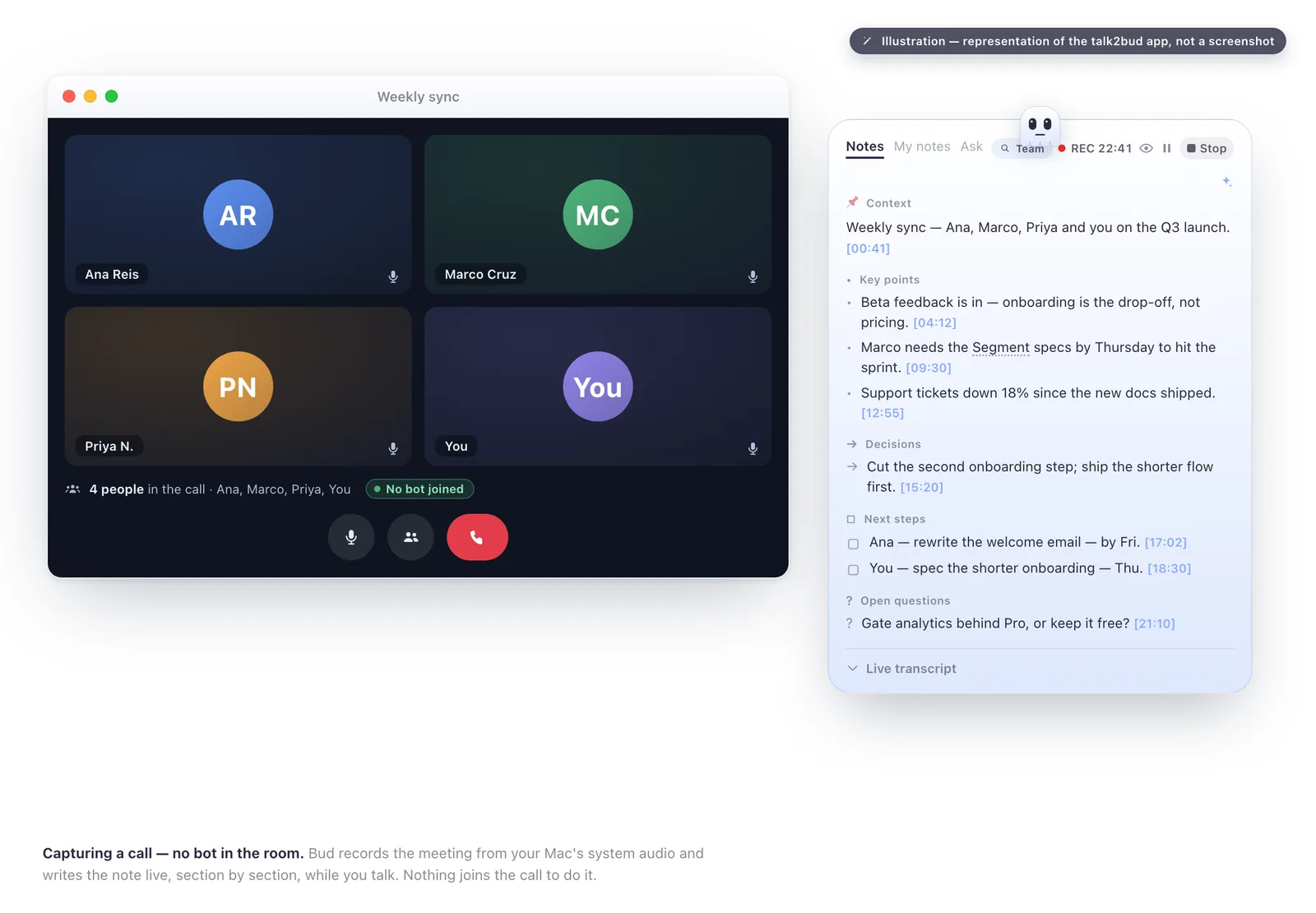
Illustration of the talk2bud app, not a screenshot: an online call captured through your Mac's system audio, no bot joining the meeting.
Where it breaks, said plainly: there is no handwriting, it runs only on a Mac, and the interface is English only. It does not replace GoodNotes for a math student or OneNote for someone on a Chromebook. It is the pick for one specific student, the Mac user who records online lectures and dictates their own notes and wants both to stay private.
The category traps students pay for
The headline price is rarely what stings. The free-tier caps are, and they hide one click deeper.
- Notion's 5 MB per-file limit. Lecture PDFs and scanned problem sets cross it quickly, and the block cap kicks in the moment you share a workspace with a study group.
- Otter's minutes math. 300 free minutes is roughly three ninety-minute lectures, then it stops until next month. The 90-minute per-session cap can clip a single long seminar.
- GoodNotes' three-notebook wall. The free tier is a demo, not a semester. Twenty minutes of audio does not cover one class.
- Notability's five-note ceiling. You hit it in a week, and recording plus transcription sits behind Plus.
- Evernote's single-device free plan. Notes on your laptop will not open on your phone unless you pay, and the paid price has been climbing for years.
- Obsidian's honest asterisk. The app is genuinely free, but syncing your notes between laptop and phone is $48/year unless you wire up your own cloud folder.
Read the pricing page before you commit a semester of notes to a tool. The cap you did not see is the one that moves you mid-term, which is the most expensive migration there is.
Where talk2bud is not the right pick
A recommendation that never loses is an advertisement. talk2bud loses these outright, and here is the name to use instead.
- You handwrite with a stylus. Buy GoodNotes or Notability. talk2bud has no ink at all.
- You are on Windows, Android, or a Chromebook. Use OneNote or Notion. talk2bud is Mac-only.
- You want a free-forever notebook. OneNote, Apple Notes, or the Obsidian app cost nothing to keep. talk2bud gives you a 10-day trial, then a subscription.
- You need notes in Portuguese or another language in real time. talk2bud's interface and dictation are English only today. Reach for a localized tool such as Notability's transcription.
- You want one searchable notebook with folders. OneNote and Evernote are built for that filing-cabinet model; talk2bud is a capture-and-dictate tool, not a filing system.
Decide in five minutes
Follow one branch at a time.
- Do you handwrite with a stylus? If yes, and you want audio synced to ink, choose Notability; if you want the best pure ink and PDF markup, choose GoodNotes. If no, keep going.
- Do you take notes offline or distrust the cloud? If yes, choose Obsidian for typed notes, or Apple Notes if you are all-Apple and want zero setup. If no, keep going.
- Do you want one hub for notes, tasks, and a course wiki? If yes, choose Notion on the free student plan. If no, keep going.
- Do you mostly capture lectures and want to dictate summaries on a Mac, with both kept private? If yes, choose talk2bud and try it against your next lecture. If your school already gave you Microsoft 365 and you just want free and reliable, choose OneNote.
FAQ
What is the best note-taking app for students?
The right note-taking app for a student depends on how they capture notes. Typing students do best in Notion (free on the student plan with a school email) or Microsoft OneNote (free). Handwriting students on an iPad do best in GoodNotes ($11.99/year) or Notability ($15.99/year). Students who mainly capture online lectures on a Mac and dictate their own notes do best in talk2bud, which records the class call from system audio with no bot joining, on the honest condition that you announce it to the class. All prices verified August 2026.
Which note-taking app is best for recording lectures?
For recording lectures with the audio tied to your notes, Notability ($15.99/year, verified August 2026) syncs the recording to your handwriting so you can tap a word and hear that moment, and Microsoft OneNote records and transcribes audio for free through Microsoft 365. For students on a Mac who want an online lecture captured straight from the Mac's system audio, with no bot in the call, disclosed rather than done in secret, and the transcript kept local, talk2bud is built for exactly that case.
Is Notion or OneNote better for students?
Notion is better for students who want a single hub for notes, tasks, and course wikis, and its Plus tier costs students nothing once they verify a school email (verified August 2026), but it has no honest offline mode. Microsoft OneNote suits the student who wants a free app that works offline on every platform and records lecture audio through Microsoft 365. Choose Notion for organization, OneNote for reliability and free lecture recording.
Is GoodNotes or Notability better for students?
GoodNotes is better for pure handwriting and PDF markup, costs $11.99/year for its Essential tier, and runs on Apple, Android, and Windows. Notability is better for lecture-heavy courses because it records audio synced to your handwriting, and its Plus tier is $15.99/year with transcription (both verified August 2026). Pick GoodNotes for ink and diagrams, Notability for the audio-plus-ink combination.
Do students need to pay for a note-taking app?
No, a student does not have to pay for note-taking software. Microsoft OneNote and Apple Notes are free and cover most class needs, Notion gives students Plus at no cost through a school email, and the Obsidian app is free for personal use (all verified August 2026). Paid tiers mainly add handwriting polish, unlimited audio transcription, or cross-device sync, so pay only once a specific free-tier cap starts to slow you down.
The next step, if voice is your lane
If you type or handwrite, one of the free tools above is your answer, and the honest move is to start there. If you capture lectures on a Mac and keep re-explaining them to yourself later, the recording is only half the work; the other half is turning a raw transcript into study notes you can actually revise from.
That is what a Lens does. In talk2bud you can build your own Lens, a small analysis playbook, and point it at a lecture transcript so it comes back as key concepts, definitions, and the questions likely to show up on the exam. The single next step is to run one real lecture through it. The 10-day trial, no card, is how you find out whether voice is your lane before you commit a semester to it.
Verified August 2026 against each vendor's pricing pages and public user reports. Compare the full lineup in our note and meeting-tool guides, and see how the dictation enhancer turns speech into finished text if writing by voice is new to you.