Malayalam Voice Typing: Every Method That Actually Works
The three engines behind every Malayalam dictation tool, the desktops that type the script but cannot hear it, and what the 2026 accuracy figures really mean.
Malayalam Voice Typing: Every Method That Actually Works
Malayalam voice typing works through three routes today: Google Docs voice typing in a current Chrome, Edge or Safari; the Gboard microphone on Android, which types into any app on the phone; and a paid speech-to-text model for audio you already recorded. Windows, macOS and Microsoft Word all type Malayalam, and none of the three listens in it.
The short version:
- On a computer: Google Docs, Tools, then Voice typing, with the language set to Malayalam.
- On Android: the Gboard microphone, with Malayalam added to your keyboard languages.
- For a recording you already have: a paid transcription model, billed by the hour of audio.
- Not available anywhere: Windows 11 voice typing, macOS Dictation, and Dictate in Word.
Search this phrase and you get ten pages offering a microphone button and a word counter. Open five and you are looking at one thing in five skins: a thin wrapper around the speech recogniser already sitting in your browser. None names the engine, and that omission costs you an afternoon. What matters is which engine hears your language at all, and where the finished text has to end up afterwards. Those two questions cut most Malayalam speakers' working day in half, because the language you think in and the language you file work in are rarely the same one.
Ten Tools, Three Engines
Everything that turns spoken Malayalam into text belongs to one of three groups, and the group predicts your experience better than the brand name does.
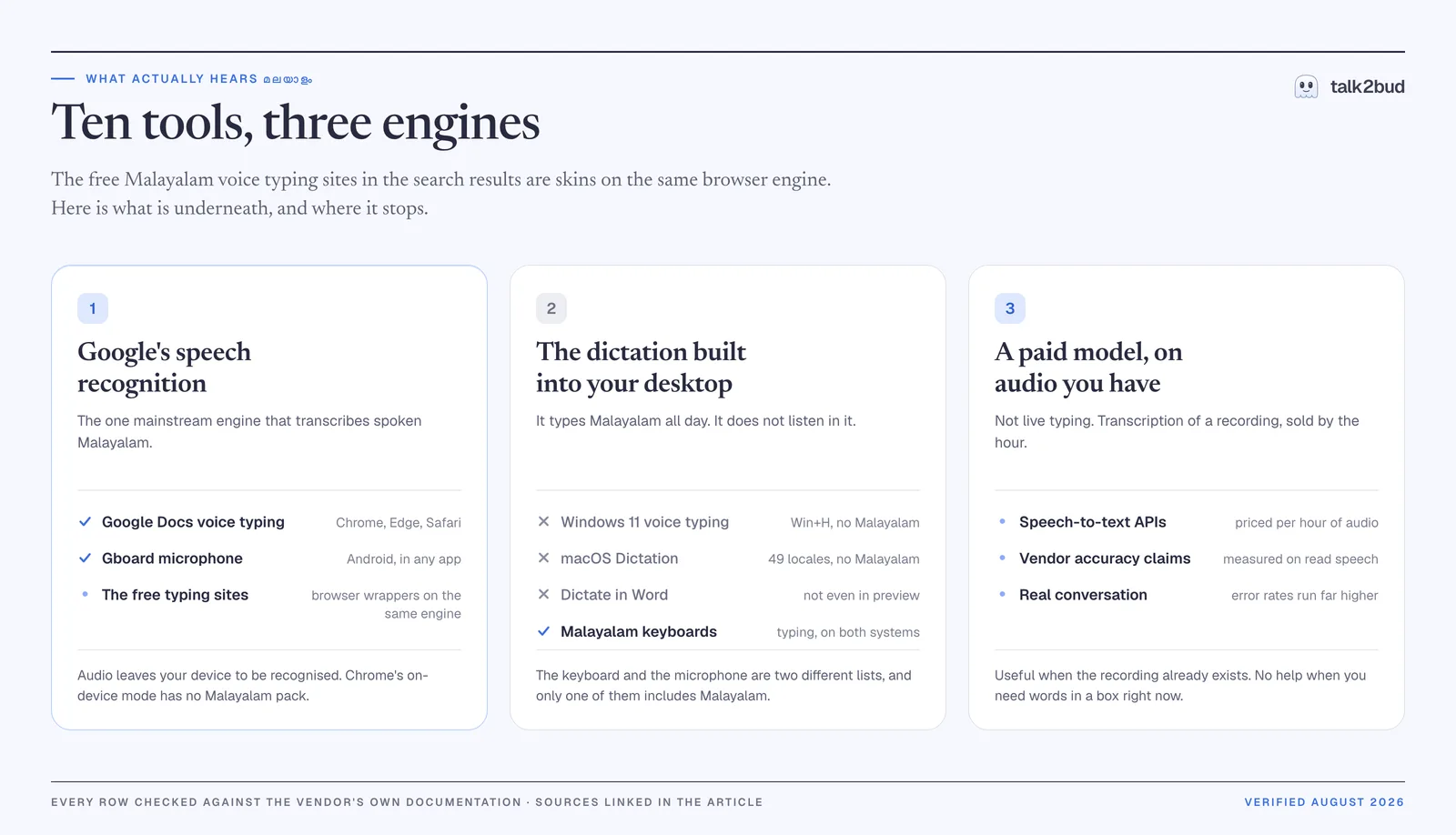
Google's speech recognition is the one mainstream engine that transcribes spoken Malayalam. Google Docs reaches it from a browser tab, Gboard reaches it from an Android keyboard, and the free typing websites reach it through the browser's SpeechRecognition interface. Same recogniser, three front doors, very different amounts of usefulness. If a browser tab is where your dictation lives today, an honest review of one free browser dictation tool shows where that ceiling sits.
The dictation your computer already has covers neither Windows nor macOS for this language, though both have shipped voice typing for years. Both will type the script all day with a keyboard layout. The keyboard list and the microphone list are two different lists, and Malayalam appears on only one.
A paid model applied after the fact takes a recording and returns text for a per-hour fee. Good for a lecture that already exists as a file; no help when you want words in a box right now.
For live dictation, then, you are using Google whichever button you press. That single fact explains why all ten of those sites fail in the same way at the same moment.
Before You Start
Five things decide whether the microphone does anything useful. Four are settings; the fifth is the one nobody mentions.
| What decides it | Where it lives | What to know |
|---|---|---|
| Your browser | Chrome, Edge or Safari, current version | Google's page now reads "This feature works with the latest versions of: Chrome, Edge, Safari". The Chrome-only line those free sites repeat is out of date |
| Your device | A computer for Docs, Android for Gboard | Dictation inside Docs is a desktop feature; on a phone the route runs through the keyboard |
| Keyboard languages | Gboard settings, Languages | Malayalam appears three times in Google's list, and the three behave differently |
| Microphone permission | Browser or Android settings | If the microphone never activates at all, the language is not your problem |
| A live connection | Any network | Recognition for this language happens on a server, so offline Malayalam dictation does not exist |
One documented limit belongs here rather than three sections down. Google is explicit that voice commands work in English alone, and that both the account language and the document language must be English for them (Google Docs Editors Help, verified August 2026). In a Malayalam session you dictate words and add punctuation with your hands.
Method 1: Voice Typing In Google Docs
This is what people are after when they search for Google voice typing on a PC, and it is the steadiest of the three routes.
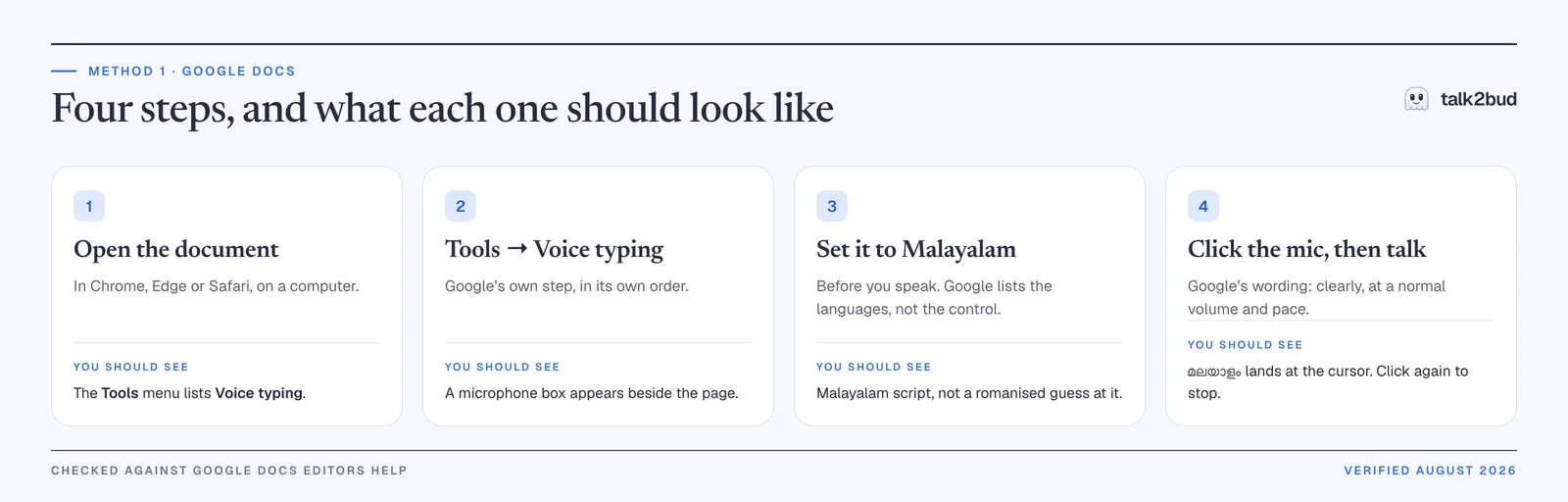
Open a document in a supported browser. Chrome, Edge or Safari, on a computer. You should see Voice typing in the Tools menu; if the entry is missing, the browser is the reason, not your account.
Open Tools, then Voice typing. Google's own step, in Google's own order. A microphone box appears beside the page.
Set the language to Malayalam. Do this before you speak. Google's help page lists Malayalam among its supported languages but writes the sequence without naming the language control, so use the output as your check: Malayalam script at the cursor, not a romanised approximation of it.
Click the microphone and talk. Google's guidance is to speak "clearly and at a normal volume and pace", then click the microphone again when you finish.
This route stops short in two places. Spoken punctuation and spoken commands stay out of reach, per the English-only rule above. And the words stay inside the document you opened, so anything bound for an email or a form is a copy and a paste away. The same engine dictates into Slides speaker notes, through Tools, then Dictate speaker notes, under the same restriction.
Method 2: The Gboard Microphone, In Any Android App
This is the real answer to the WhatsApp version of the question, one of the most searched forms of the whole topic. The messaging app has no dictation of its own. Your keyboard has it, and the keyboard works everywhere.
Add Malayalam in Gboard's language settings. Google's help lists three separate entries: "Malayalam, Latin", "Malayalam, Malayalam" and "Malayalam, Transliteration" (Gboard Help, verified August 2026). The third takes Manglish and returns Malayalam script.
Open any app and tap into the text field. A chat, a search box, a notes app, a form. The keyboard does not care which.
Tap the microphone on the keyboard and start speaking. Words should appear directly in the field, with no intermediate box to copy out of.
Switch languages from the abbreviation at the bottom left of the microphone bar, which is how you move between Malayalam and English mid-task (Gboard Help, verified August 2026).
Gboard's own documentation carries two caveats worth reading before you trust this in a work thread: "Talk-to-text doesn't work with all languages", and "Punctuation might not be available in all languages."
Rambler, the newer Gemini-powered voice input that tidies speech as it goes, is a separate feature: it needs a Pixel 11, and the languages it names as tuned include Hindi and "other supported Indian languages", never Malayalam.
Method 3: Transcribing Malayalam You Already Recorded
A recorded lecture, an interview, a call you were given permission to keep: this is a different job from typing, and the browser tools handle it badly or not at all. Commercial models take the file and return text, priced by the hour of audio. ElevenLabs, for one, lists this language at $0.40 per hour of transcribed audio with a free trial (its Malayalam page, verified August 2026).
Read the next two sections before you budget for it.
What Supports Malayalam, And What Only Looks Like It
One row at a time, each checked against the vendor's own page.
| Tool | Hears Malayalam | What the vendor's page says | Source |
|---|---|---|---|
| Google Docs voice typing | Yes | On the supported language list; runs in current Chrome, Edge and Safari | Google Docs Editors Help |
| Gboard microphone, Android | Yes | Three keyboard entries: Latin, Malayalam, Transliteration | Gboard Help |
| Windows 11 voice typing, Win+H | No | Indian languages listed: Gujarati, Hindi, Marathi, Tamil (India), Telugu | Microsoft Support |
| macOS Dictation | No | 49 locales listed, with Hindi the sole Indian language among them | Apple, macOS feature availability |
| Dictate in Microsoft Word | No | Hindi supported; Gujarati, Marathi, Tamil, Telugu in preview; Malayalam in neither | Microsoft Support |
| Live Caption, on-device browser packs | No | List runs Danish to Turkish and includes Hindi, without Malayalam | Google Chrome Help |
Read the second column top to bottom and a pattern falls out. Every yes belongs to Google. Every no belongs to an operating system or to an offline mode. Which gives you the real shape of your options: as of August 2026 there is no local, no-account, no-network way to dictate this language on a mainstream desktop, and hunting for a better free website will not produce one.
What Accuracy To Expect, In Numbers
Malayalam speech recognition has two published figures. They differ by a factor of four, and both are honest.
About one word in twenty, on prepared speech. ElevenLabs publishes 4.6% word error rate with Scribe v1 on the FLEURS benchmark, against 5.6% for Gemini Flash 2 and 99.6% for Whisper Large v3 (verified August 2026). FLEURS is read speech: written sentences, clean audio, one speaker at a time.
About one word in five, on real conversation. The Voice of India benchmark, published on arXiv in 2026, covers 306,230 utterances, 536 hours and 36,691 speakers across 15 Indian languages, and measures unscripted telephone conversation. Malayalam's best result there is 18.9, next to 5.0 for Hindi. Generalist models fall apart on it: GPT-4o Transcribe at 97.0, AssemblyAI Universal at 107.5, GPT-4o Mini Transcribe at 167.8 (arXiv 2604.19151, verified August 2026).
That gap is the most useful thing on this page. On prepared Malayalam the best systems miss roughly one word in twenty; on unscripted Malayalam conversation the best of them miss closer to one in five, per the 2026 Voice of India benchmark. Clearing that second bar is what a dictation tool owes a language before it claims to support one, which is why talk2bud is built for English and says so on the box.
And 13.9 points of what gets counted as error is not error. A companion paper reports that for Malayalam the average difference between standard word error rate and its orthographically informed version runs to 13.9 points across models, because conventional scoring punishes legitimate spelling variation along with the splitting and merging of compound words, "a common variation type for agglutinative languages like Malayalam" (arXiv 2603.00941, verified August 2026). A sizeable share of every reported mistake, in other words, is a valid alternative spelling you would have accepted without blinking.
The English Words Inside Your Malayalam Sentences
Nobody speaks Malayalam in a laboratory. Real sentences carry English inside them, and those English words are rarely decorative: meeting, deadline, invoice, escalation, sprint, the exact vocabulary your work runs on. The recogniser has to guess which language it is hearing, phrase by phrase, and this failure mode goes unmentioned in every top result.
Android Police documented the behaviour in a report on Google's handling of bilingual speech: "Google arbitrarily switches languages in the middle of a sentence while processing." Its workaround is to turn off the keyboard's multilingual typing option and change languages by hand, and the same piece says outright that this "isn't a real fix for the underlying issues Google has with multiple languages" (Android Police, accessed August 2026).
What helps more comes in two parts. The transliteration layout, of Gboard's three Malayalam entries, is built for how bilingual people really type: you produce Manglish, the Latin spelling of Malayalam words, and it returns the script, so a single keyboard carries a sentence that changes language twice. And a ninety-second diagnostic, which is to speak one ordinary paragraph at ordinary speed without cleaning up your vocabulary for the machine. What comes back tells you which half of your day the tooling is failing, and the closing section turns it into a number.
Your Mac Types Malayalam But Does Not Hear It
macOS ships a Malayalam keyboard. Add it from Input Sources, choose the Malayalam QWERTY layout, and the script types as cleanly as English. Apple's own note about adding an input source is the giveaway: the new language joins your preferred languages and the Dictation list "(if available)".
Here it is not available. Apple's feature availability page lists 49 Dictation locales, and only Hindi represents India (verified August 2026). Word behaves the same way, reaching Hindi while keeping four other Indian languages in preview.
So the Mac path is short and specific: type it with the keyboard layout, or dictate into Google Docs in Safari, which Google's current documentation supports. Your Mac's microphone stays in English, or in one of the other 48 locales Apple ships.
Keyboard in one language and microphone in another is where a lot of bilingual Mac users live all day. talk2bud sits on the English side of that split, and only there.
Using talk2bud For The English Half Of A Bilingual Day
Plainly, first: talk2bud does not do Malayalam. It is a Mac app (Apple Silicon) built for English, and that focus is the reason its dictation behaves the way it does, rather than an apology for something missing. Methods 1 and 2 cover your Malayalam half. For the English half, which for many people in Kochi or Bengaluru is the half that ships work to a client, this is the flow.
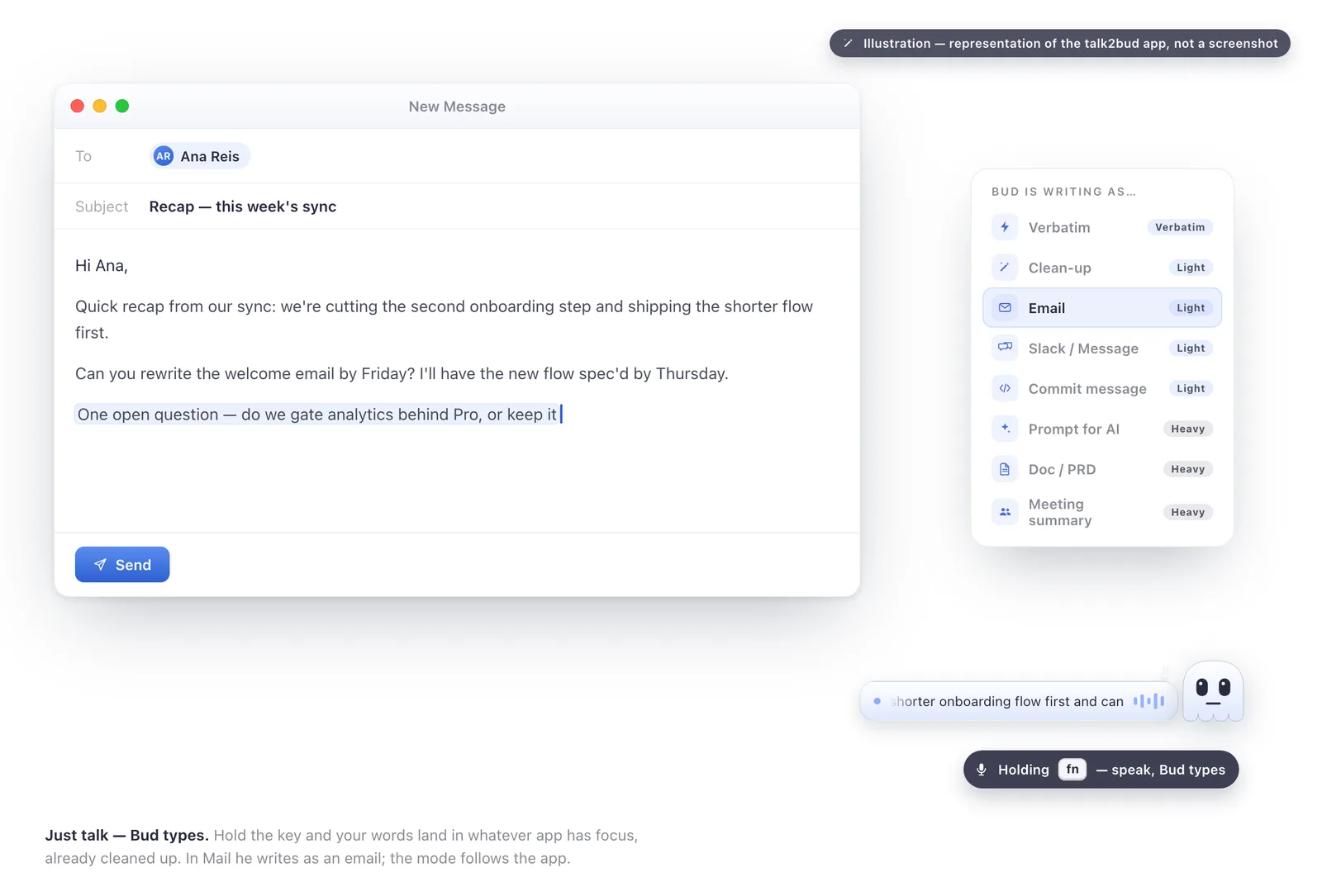
Hold the dictation key and talk. Your English lands as finished text in whatever app already has focus, with no tab to copy out of and no box in the middle.
Let the mode follow the artefact. The enhancer carries modes for the thing you are writing, an email, a commit message, a ticket, a PRD, a prompt, so one spoken sentence arrives shaped for its destination instead of arriving as raw transcript.
A quick example of what the mode does, not a measured result. Say ok tell ana we're cutting the second onboarding step and shipping the shorter flow first, and ask her to redo the welcome email by friday, and Email mode delivers it addressed, punctuated and broken into lines, instead of one lowercase run-on.
Capture the English call the same day. talk2bud transcribes calls from your Mac's system audio, so nothing joins the meeting as a participant and no bot appears in the attendee list. Capturing without a bot is not capturing in secret. Nothing announces itself to the room, which is precisely why you say so out loud and get everyone's yes first, and the app treats that consent as an explicit step rather than a checkbox nobody reads.
Pick a Lens for the kind of call it is. A Lens is a playbook for one meeting type, a sales call, a team sync, a 1:1, an interview, and the app reads the transcript against the one you chose once the call ends.
Keep the private conversation private. A chosen team call and its analysis can live in a Channel the group can see. A 1:1 stays between the two people by default, because that conversation belongs to them.
What it costs is on talk2bud's pricing page. What it will not do is type your other language, which is why two thirds of this guide exist and never mention it.
Where Your Voice Goes, And Who Else Is In The Recording
Two separate questions hide inside "is this private", and this language has a specific answer to the first.
Your audio leaves the device. Chrome 139 added on-device recognition to the browser's Web Speech API in 2025, so some languages can now be transcribed without the sound going anywhere. Those packs come from the same set that powers Live Caption, and Malayalam is not among them. Chrome's Live Caption page promises that "All audio and captions are processed locally, are never stored, and never leave your device", a promise covering the languages on that list. This one sits outside it, which makes browser dictation here a server-side act, in Google Docs and on all ten free sites alike.
Other people's voices are a different question. Dictating your own sentences is your business alone. Point Method 3 at a recorded lecture, interview or call and other people are in that file, and a transcript makes their words searchable in a way a recording never quite did. Say it before you start, in your own words or these:
"Before we get going: I'm recording this so I don't lose the details. Say the word if you'd rather I didn't, and I'll stop."
Ten seconds of awkwardness, and the whole difference between a recording you can show someone and one you have to hide.
Malayalam Voice Typing FAQ
How does Malayalam voice typing work? Malayalam voice typing sends your speech to a speech recognition service, which returns Malayalam text. In Google Docs and on the Gboard keyboard, Google's recogniser does that work, and the audio leaves your device to reach it, because Chrome's on-device recognition ships no Malayalam language pack (verified August 2026). The free Malayalam voice typing websites are thin pages built on the browser's own speech recognition interface, so they arrive at the same engine by a longer road.
Is Malayalam voice typing available for mobile devices? Yes, on Android, through the microphone on the Gboard keyboard, which types into any app rather than into one website. Google's Gboard documentation lists three Malayalam keyboard options, including a transliteration layout that accepts Manglish and returns Malayalam script. Gboard's help adds two limits: talk-to-text does not work with every language, and punctuation may be unavailable in some of them.
Can I do Malayalam voice typing in MS Word? No. Dictate in Microsoft Word supports Hindi among Indian languages and lists Gujarati, Marathi, Tamil and Telugu as preview languages, with Malayalam absent from both (Microsoft's Word dictation page, verified August 2026). To get Malayalam into a Word document, dictate it in Google Docs using Chrome, Edge or Safari and copy it across, or type it with a Malayalam keyboard layout.
How do I do Malayalam voice typing in WhatsApp? WhatsApp provides no Malayalam dictation itself; the phone's keyboard provides it. On Android, add Malayalam to Gboard, open the chat, tap into the message field, tap the keyboard's microphone and speak, and the text lands in the message box. WhatsApp's separate voice message transcript feature runs on the device and launched with a limited set of languages, so check its current list before relying on it here.
Can I speak in Malayalam and get English text? Not in one step, in any mainstream tool. Google Docs voice typing and the Gboard microphone turn Malayalam speech into Malayalam text, and converting that into English is a separate translation afterwards. Google's documentation also restricts spoken commands to English and requires an English account and document language for them, a reminder that the language you dictate in and the language the interface runs in are two different settings.
Is Malayalam voice typing free? Both live routes are free. Google Docs voice typing needs a Google account and a current Chrome, Edge or Safari, and the Gboard microphone comes with the free Android keyboard. Money appears only for transcribing recordings you already hold, where commercial speech-to-text is billed per hour of audio. Neither free route works offline for this language, because the recognition happens on a server rather than on your device.
What Was Verified, And When
Verified August 2026. Every support claim above was read from the vendor's own page this month: Google Docs Editors Help for the dictation languages and browsers, Gboard Help for the three Malayalam layouts, Microsoft Support for Windows 11 voice typing and for Dictate in Word, Apple's feature availability page for the Dictation locales, and Chrome Help for the Live Caption list. The accuracy figures come from the Voice of India benchmark and its companion paper on orthographic evaluation, both on arXiv in 2026, plus ElevenLabs' published numbers for its own model. The method here is document review rather than a laboratory, and vendors add and drop languages quietly, so re-check the row your workflow depends on.
The One Test To Run Next
Open a document, set the language to Malayalam, and dictate a single paragraph the way you would say it aloud to a colleague, English words and all. Then count the English words that came back in Malayalam script. The number tells you what no tool page will: how much of your daily dictation is genuinely Malayalam, and how much is English wearing a Malayalam sentence. If the second figure is larger, that half of your day deserves a tool built for it, and that is the half talk2bud handles on a Mac.