Otter.ai, Behind The Logo: An Honest Review And The Real Price
What the friendly otter really costs, what it does well, and the consent problem behind the bot that joins your calls. Verified August 2026.
Otter.ai, Behind The Logo: An Honest Review And The Real Price
Most people who type "otter ai logo" into a search bar are not shopping for clip art; they saw the friendly otter in a meeting invite or a coworker's notes and want to know whether to trust the product behind it. The short answer: Otter.ai is a capable transcription and meeting-notes service that records your calls, writes searchable notes, and does it well in clean audio, but its whole model rests on a bot that joins the meeting, and in 2026 that bot is the subject of a federal wiretap class action over recording people who never agreed. This review reads the pricing off Otter's own page, the limits off real user reviews, and the consent question off the policy and the court docket, then names where a different design fits better.
The logo is doing exactly what a logo should. A cartoon otter is disarming, and it lands on the moment when the software is quietly recording a room. That gap between the mark and the mechanism is the thread of this review.
Who Otter.ai is for: teams that live in Zoom, Google Meet, or Microsoft Teams, want an auto-joining assistant that transcribes every call and stores it in a searchable archive, and are comfortable with a visible bot in the participant list. For that job it is one of the more polished options.
Who it isn't for: anyone recording sensitive or one-to-one conversations who does not want a third-party bot in the room, anyone who needs capture on a Mac without a browser tab or a meeting guest, and anyone counting minutes, because the caps bite even on the paid plans.
How this review was verified. Read in August 2026 against Otter.ai's own pricing page and privacy policy, the consolidated class-action docket in the Northern District of California, and public user reviews on Capterra and G2. The evidence is documentary: public pages, court filings, and dated user reports, each linked below, not a private test you are asked to take on faith.
What The Otter.ai Logo Is Actually Selling
Otter.ai is the product of a company legally named AISense, and the otter in the wordmark is a mascot, not a feature; there is no deeper cipher to decode in the mark itself. What it stands for is a meeting assistant. You connect your calendar, and Otter's notetaker (the bot Otter used to call OtterPilot and now calls Otter Notetaker) joins your Zoom, Google Meet, or Microsoft Teams calls, transcribes them live, tags speakers, writes a summary, and drops the whole thing into a searchable web workspace. There is a Chrome extension, iOS and Android apps, and an AI Chat that answers questions about past meetings.
That is the real thing sitting under the logo. It is a cloud service that captures your calls by sending a guest into them, and everything good and bad about Otter flows from that one design decision.
What Otter.ai Does Well
Give Otter clean audio and a single clear speaker and it is genuinely good. Public reviews and Otter's own materials put accuracy in the low-to-mid 90s percent for well-recorded English, which is enough that a transcript needs a light edit rather than a rewrite.
The searchable archive is the feature people actually stay for. Every call becomes a text record you can search months later, and the AI Chat can pull an answer out of a meeting you barely remember attending. For a team that runs six calls a day and needs to find what was said, that archive earns its keep.
Platform coverage is the third strength, and it is real. Otter auto-joins across Zoom, Google Meet, and Microsoft Teams from a connected calendar, so once it is set up, capture happens without anyone lifting a finger. It also carries the security certifications buyers ask for: SOC 2 Type II, ISO 27001, GDPR alignment, and AES-256 encryption at rest.
None of that is in dispute. The question a buyer has to weigh is what the same design costs you, in money and in consent.
What Otter.ai Really Costs In 2026
Otter's pricing is public, and the honest work here is separating the sticker price from the annual reality. These figures are read from Otter's pricing page, verified August 2026.
| Plan | Price | The real annual cost | The catch |
|---|---|---|---|
| Basic | Free | $0 | 300 transcription minutes a month, 30 minutes per conversation, 3 lifetime file imports |
| Pro | $16.99/user/mo, or $8.33 billed annually | ≈$100/user/year on annual billing; ~$204 paid monthly | 1,200 minutes a month (about 20 hours), 90 minutes per meeting, 10 imports a month |
| Business | $30/user/mo, or $19.99 billed annually | ≈$240 per seat a year on the annual plan; $360 month to month | "Unlimited" meetings but a 4-hour-per-meeting cap, billed per seat |
| Enterprise | Custom | Quote only | Gated behind a sales demo |
Two things hide in that table. First, the annual discount is the price; the month-to-month rate is roughly double, so "$8.33" is a number you only see if you commit to a year up front. Second, the minute cap is not a free-tier quirk. Pro stops you at 1,200 minutes a month, and one reviewer described the tax of that plainly: "Having to track usage and stay within a set number of transcription minutes added unnecessary stress" (Brad P., Capterra, May 2025). Business lifts the monthly cap but keeps a four-hour ceiling per meeting and charges per seat, so a ten-person team is looking at roughly $2,400 a year.
For comparison, a Mac-native tool that captures the call locally and also handles your dictation removes the second subscription most Otter buyers do not realize they are carrying. What talk2bud costs is one line, not a notetaker bill plus a voice-typing bill.
Where Otter.ai Pinches
The limits are consistent, and public reviewers name them in the same places every month.
Accuracy falls off the moment the audio gets real. Overlapping speakers, background noise, and accents all cost you. "Because of accents and background noise, the system often makes mistakes," wrote one reviewer (Mohamad A., Capterra, April 2025), and another was blunter: "Even in clean audio environments, transcripts often topped out around 85% accuracy" (Brad P., Capterra, May 2025).
Speaker labeling gets lost past a few voices. In a busy call Otter tends to fall back on generic tags. "Only some names are captured and others are just listed as Speaker 1 or Speaker 2," one reviewer noted (Executive Director, Capterra, November 2022).
Action items are the weak spot buyers assume are the strong spot. The transcript is fine; the "so what" often is not. "Otter rarely captured the real next steps or key takeaways from meetings," the same May 2025 reviewer wrote, which means a human still reads the whole thing to find the decision.
Language support is narrow. Otter is English-first, with a short manual list (English, Spanish, French, German, and Japanese in reviewer accounts) and no automatic language detection. If your calls run in anything outside that set, this is a wall.
The bot is hard to un-invite. Because it rides your calendar, it shows up where you did not expect it. "I can't figure out how to uninvite Otter to some of my events," one reviewer wrote (Kaitlin M., Capterra, December 2024). That is a mild annoyance until you consider who else is in those events.
The Bot In The Room, And The Consent Problem
Here is the part the feature comparisons skip. Otter captures a meeting by placing a participant in it, and that participant records everyone, whether or not everyone agreed.
In 2026 that is not a hypothetical. A consolidated class action is proceeding in the U.S. District Court for the Northern District of California (lead case Brewer v. Otter.ai, Inc., No. 5:25-cv-06911, filed August 15, 2025, consolidated October 22, 2025). The complaints allege that Otter's notetaker "joins meetings on platforms like Zoom, Google Meet, and Microsoft Teams, then captures and transcribes what participants say, including people who are not Otter users and were never asked to agree" (openclassactions.com, accessed August 2026). The claims run under the federal Wiretap Act and California's two-party-consent Invasion of Privacy Act. A motion-to-dismiss hearing was held May 20, 2026, with a ruling pending as of this writing; the case is unresolved, and these are allegations, not findings. Separately, reports describe organizations, including the University of Massachusetts, restricting Otter over all-party-consent policies.
The data policy adds the second half. Otter's own privacy policy states that it uses customer content for "training our proprietary AI technology on de-identified audio recordings and on transcriptions (which may contain Personal Information)" (Otter privacy policy, accessed August 2026). De-identified audio is one thing; transcriptions that may carry personal information, used to train models, is a line worth reading before you send Otter into a client call.
None of this makes Otter malware. It makes Otter a product whose capture method assumes consent it does not always collect, and the friendly logo is precisely what makes that assumption easy to miss. The honest version of meeting capture starts from the opposite default: no hidden guest, and you still tell the room.
Capturing The Same Meeting Without A Bot
The alternative is not "record in secret instead." It is to capture the call without adding a participant, and to keep the consent step where it belongs, out loud. On a Mac, that is the bet talk2bud makes. It records the online call from your Mac's system audio, so nothing joins the meeting as a guest and no bot appears in the attendee list. Capturing without a bot is not the same as capturing in secret: it is honest only when you still tell the room and get the go-ahead, which is why talk2bud's consent flow is explicit rather than a silent guest in the corner.
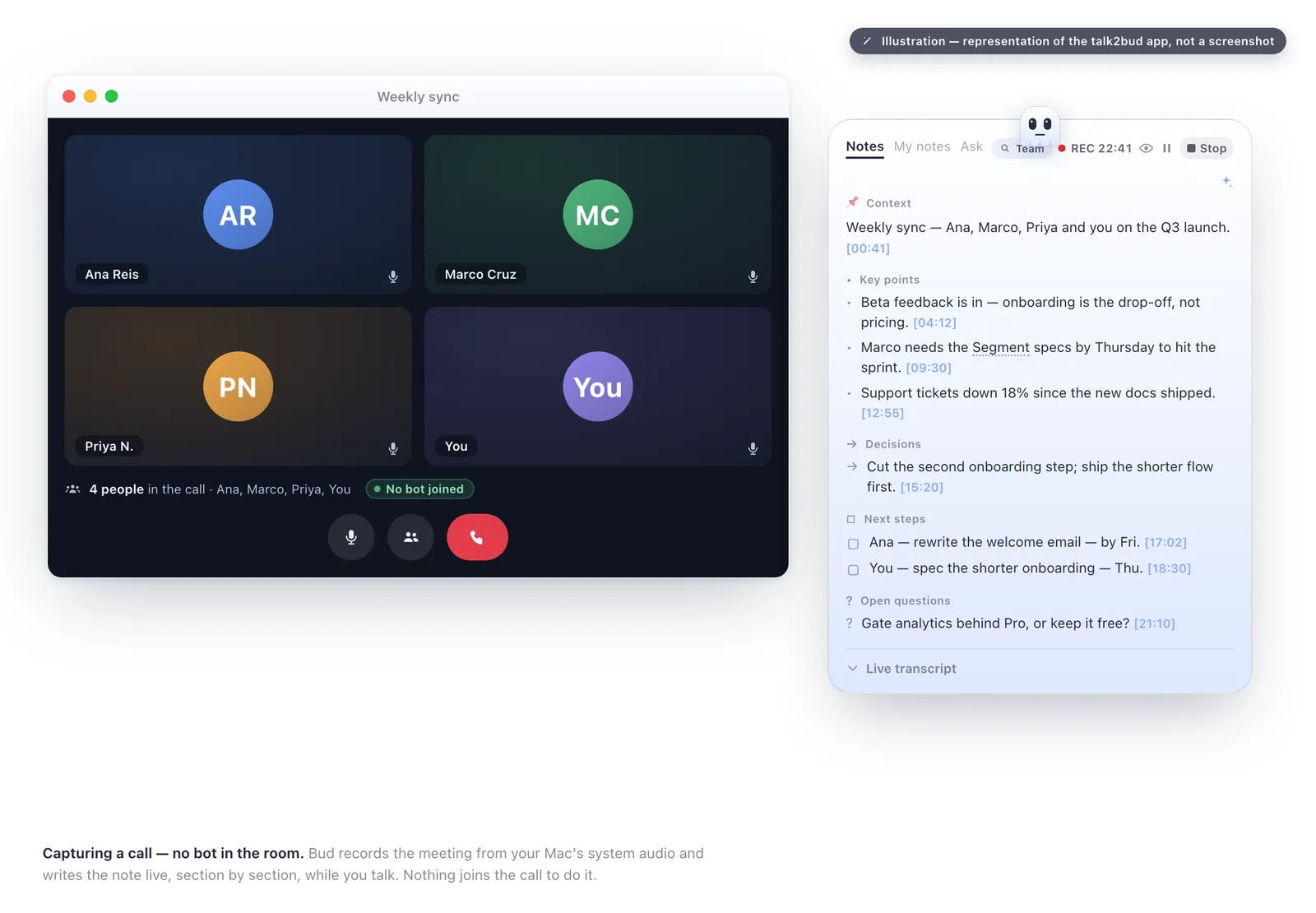
From there the flow is short. You point a Lens at the call, a small analysis playbook for that meeting type (a sales call, a 1:1, a client discovery), and at the end talk2bud reads the transcript against that Lens and returns the analysis, rather than a generic summary you still have to mine for the decision. A 1:1 stays between the two people in it and is not pushed to a team channel by default. And because it is a Mac-native app rather than a browser service, the audio starts on your machine instead of a guest's cloud.
The second half is what keeps it from being one more notetaker. Dictation lives in the same app, so speaking a message into whatever window has focus and capturing a meeting live are one tool, not two subscriptions. Its limits are stated as the focus they are: talk2bud is Mac-only and English-only for now, and it is paid software, so it is the wrong pick if you need Windows, another language, or a free tier. Capturing the conversation honestly on a Mac is the whole design.
Alternatives, By Why You're Leaving
The right replacement turns on the reason you are walking away from Otter, not on a ranking. The honest alternatives breakdown sorts the field by motive; the short version is here.
Leaving because of the bot and the consent question: on a Mac, talk2bud pulls that online meeting from system audio with no participant-guest and an explicit consent step, which is the exact axis where Otter's model is under fire. If you are on Windows, this one does not apply, because talk2bud does not run there.
Leaving because you need Windows, mobile, or many languages: stay with Otter, or look at Fireflies. Otter runs on the web, iOS, and Android and covers a handful of languages; talk2bud does neither. If cross-platform reach is the deciding factor, Otter is the more honest recommendation, and this review will not pretend otherwise.
Leaving because you want a free tier: Otter's Basic plan gives you 300 minutes a month for nothing, and few tools match that for casual use. A paid Mac app is the wrong answer if free is the requirement.
Leaving because you want the decision, not the raw transcript: this is where a Lens that reads the call against a meeting-type playbook does the work Otter's weak action-item detection leaves on the table.
Otter.ai, Scored By Criterion
Scores are 1 to 5, read against the sources in the methodology box. No product scores 5 everywhere, and Otter is strongest exactly where its risk also lives, in how aggressively it captures.
| Criterion | Score (1-5) | Why |
|---|---|---|
| Accuracy (clean English audio) | 4 | Low-to-mid 90s percent in good conditions; drops with noise and accents |
| Meeting platform coverage | 5 | Auto-joins Zoom, Meet, and Teams from your calendar |
| Searchable archive and chat | 4 | Strong recall of past meetings; AI Chat is genuinely useful |
| Speaker labeling | 3 | Reliable with few voices, falls back to "Speaker 1" past that |
| Action items and takeaways | 2 | Transcript is solid; the "next steps" often are not captured |
| Language range | 2 | English-first, short manual list, no auto-detect |
| Minute value | 3 | Caps bite on Free and Pro; Business is per-seat with a 4-hour ceiling |
| Consent model | 2 | Records via a bot in the room, non-participants included; under class action |
FAQ
Is Otter.ai worth it?
Otter.ai is worth it for teams that want automatic, searchable transcription across Zoom, Meet, and Teams and are comfortable with a bot joining every call. It is a poor fit for sensitive or one-to-one conversations where a third-party participant in the room is a problem, and its minute caps and English-first language support limit heavier or multilingual use. As of August 2026, whether it is worth it depends less on accuracy than on whether you accept its bot-based capture.
Is Otter.ai free?
Otter.ai has a free Basic plan that includes 300 transcription minutes per month, a 30-minute cap per conversation, and 3 lifetime file imports (verified against Otter's pricing page, August 2026). Paid plans begin at $16.99 monthly per Pro user, or $8.33 with annual billing. The free tier is real but capped, and heavy users hit the ceiling quickly.
Is Otter.ai safe to use?
Otter.ai holds SOC 2 Type II, ISO 27001, and GDPR certifications and encrypts data with AES-256, so it is safe in the security sense. The open question is consent, not security: Otter's privacy policy says it trains its AI on de-identified audio and on transcriptions that may contain personal information, and a 2026 federal class action alleges it records meeting participants who never agreed. For confidential material, that consent gap is the real risk to weigh.
Does Otter.ai record without consent?
Otter.ai's notetaker joins meetings and records all participants, and a consolidated class action in the Northern District of California (Brewer v. Otter.ai, No. 5:25-cv-06911) alleges it captured people who were "never asked to agree," including non-users. Otter typically asks the meeting host for permission but does not separately ask every participant. In two-party-consent states, recording someone without their agreement can be unlawful, so telling everyone on the call is the safe practice regardless of the tool.
How accurate is Otter.ai?
Otter.ai reaches roughly low-to-mid 90s percent accuracy for clearly spoken English in clean audio, according to public reviews verified in August 2026. Accuracy drops with background noise, overlapping speakers, and strong accents, and one Capterra reviewer reported transcripts topping out near 85% even in clean conditions. Speaker labeling also degrades in calls with more than a few participants.
How much does Otter.ai cost?
Otter.ai is free on Basic. Pro runs $16.99 monthly per user, dropping to $8.33 with annual billing; Business runs $30 monthly per user, or $19.99 annually, verified against Otter's pricing page in August 2026. Enterprise pricing is custom and requires a sales demo. The annual rate is roughly half the month-to-month rate, so the advertised low price assumes a yearly commitment.
If you searched the Otter.ai logo because a bot showed up in your calls and you wanted to know what it was, here is the decision in three lines. Run Otter on Windows or mobile, or across several languages, and its coverage is hard to beat. Record sensitive or one-to-one conversations, and the bot in the room is the reason people are leaving it in 2026. Work on a Mac and want the same meeting captured without a guest, on a consent step you say out loud, and the one next move is to try talk2bud's meeting capture against your next call and read it back against a Lens.