SpeechTexter Speech to Text, Reviewed Honestly (2026)
What SpeechTexter does well, the real price with a date on it, and where browser dictation stops short of your apps. Verified August 2026 against the source.
SpeechTexter Speech To Text, Reviewed Honestly (2026)
Every SpeechTexter review opens with one number: how accurate the speech to text is. That is the wrong number to open with. Dictation is not won or lost on how well a tool hears you; it is decided in the two seconds after the words appear on the screen. What matters is whether they land, finished, in the app you were already writing in, and whether the tool that catches your voice also catches your calls or leaves that to a second app and a second bill. Score SpeechTexter on accuracy and it looks fine. Weigh it on where the text goes, and on what the tool leaves you still needing, and the review reads differently.
SpeechTexter is a free, browser-based speech to text tool that types your voice into a web page using Google's speech recognition. It runs in Chrome with no account and covers 70+ languages. It is genuinely useful for quick multilingual notes and genuinely limited: no offline mode, no typing into your other apps, and every word streams to Google. Verified August 2026.
The Verdict: Who SpeechTexter Is For, And Who It Isn't
SpeechTexter earns its keep at one job and stalls at the one people expect next. As a free box you open, talk into, and copy out of, it works and asks nothing of you. As a way to put words straight into whatever app you actually work in, it was never built for that, and it shows on the first paste.
Who it's for: anyone who wants a free scratchpad for voice notes, drafts an email or a blog post by talking, practices a second language, or needs quick multilingual dictation without installing a thing. The price is right and the setup is nothing.
Who it isn't for: anyone who wants to dictate straight into Slack, a code editor, or a support ticket without a round of copy and paste; anyone off Chrome, or on an iPhone; anyone speaking sensitive material who would rather it not travel to a third party. Those readers hit a wall, and this review names where to go over it, including a native Mac tool built around the output problem the whole way down.
How this review was verified. Read in August 2026 against SpeechTexter's own site, Mozilla's Web Speech API documentation, the Google Play listing, and public user reviews on Capterra and Willow Voice. The evidence is documentary: public pages and real user reports, each linked and dated, not a private test I am asking you to take on faith.
What SpeechTexter Is
SpeechTexter is a free web application that turns speech into text in real time. You open speechtexter.com in Chrome, allow the microphone, pick a language, and start talking; the words show up as you speak. It pitches itself for notes, documents, reports, and blog posts, and it adds voice commands like #newparagraph and #newline plus a short custom list for punctuation. A companion Android app and a Chrome extension wrap the same engine.
How SpeechTexter's Speech To Text Actually Works
The engine is not SpeechTexter's own. Per its site, "SpeechTexter is using Google Speech recognition to convert the speech into text in real-time" (speechtexter.com, accessed August 2026). That single fact explains most of the tool's behavior, the good and the bad of it.
On the desktop it runs only in "the latest version of the Google Chrome browser (other browsers are not supported)." Mobile browsers add Edge, Opera, Brave, and Vivaldi. Getting going is honestly fast: "No download, installation or registration is required." Language coverage is real, spanning 70+ languages and dialects, which is where the tool outruns the paid English-first apps for casual use.
Two properties fall straight out of leaning on the browser engine. Recognition needs the network, so a weak connection returns a "Network error" and nothing gets typed. And the audio does not stay on your machine, a point the privacy section below reads straight off the specification.
What It Does Well
The free price is not a trial or a teaser. SpeechTexter's web version has no paid tier at all, so the account you never open cannot be upsold. For a reader who wants to talk instead of type for ten minutes, that alone clears the bar.
Setup speed is the second real strength. Time from opening the page to dictating a sentence is counted in seconds, because there is nothing to install and nothing to log into. A verified reviewer on Capterra called it "very smooth" and "easy to use" (June 2023), which matches what the design promises.
Language range is the third. Seventy-plus languages and dialects make it a practical scratchpad for multilingual users and language learners, a case most polished dictation apps ignore. Another Capterra reviewer put the everyday value plainly: "it's nice to have a talk to text option for the business" (July 2021).
Accuracy, in the narrow case it is built for, holds. Speaking clearly into a decent microphone in a quiet room, English recognition lands in the low-to-mid 90s percent, which is enough for a first draft you were going to edit anyway. The catch is that "clearly," "quiet," and "decent microphone" are all doing heavy lifting in that sentence.
The Real Price, And The Costs That Are Not On A Pricing Page
SpeechTexter is free. The web app costs nothing, forever, with no seat pricing and nothing to upgrade into.
| What you use | Price | The catch |
|---|---|---|
| Web app (Chrome desktop) | Free | Chrome only; no offline mode |
| Chrome extension | Free | Same engine, same limits |
| Android app | Free, ad-supported | 3.7 stars across 6,900+ reviews on Google Play |
| A paid tier | Does not exist | Directory sites imply one anyway |
The annual cost is $0, and the honest work of this section is clearing a false signal out of the way. Business software directories such as Capterra list SpeechTexter's pricing as "available on request," which is the template those sites stamp on every product whether or not a sales team exists. There is no plan to request. Reading that phrase as a hidden enterprise price is the single most common way people misjudge what SpeechTexter costs.
The genuine costs sit off the pricing page. They are the ads on the Android app, the editing pass every raw transcript needs, and the copy-and-paste step between the SpeechTexter window and wherever the text was actually headed. None of the three is a line item, and together they add up faster than a subscription would. That last one, lifting the text out of a tab and dropping it where it belongs, is the cost this review keeps circling back to, because a tool that put the words into the app you already had open would erase it outright.
Where SpeechTexter Pinches
The limits are consistent, and public reviews name them in the same spots the specification predicts.
It types into a box, not into your apps. SpeechTexter dictates into its own web page. Getting that text into Gmail, Notion, a terminal, or a ticket is a manual copy and paste, every single time. There is no system-wide dictation that drops words into whatever window has focus.
Accuracy falls off outside the ideal case. Accents cost you. As one verified reviewer wrote, "Sometimes the transcribed words are incorrect if you have a certain accent" (Capterra, April 2018), and another added that "speech recognition could definitely be a little bit better, you have to say the words very clearly" (July 2021). Formatting drifts too: a reviewer flagged that "Speech Texter adds extra spaces in between words that I then need to edit out" and was "frequently surprised at the number of words that are capitalized" (January 2020).
Proper nouns are a recurring tax. Because the engine is Google's general model with no learning from your corrections, names, product terms, and jargon come back wrong and stay wrong. A public review dated August 12, 2026 put it bluntly: SpeechTexter "runs on outdated Google speech recognition with no AI learning or personalization," and "proper nouns come back misspelled" (Willow Voice).
No offline, no iPhone. Lose the connection and dictation stops cold. Reach for it on an iPhone or iPad and there is nothing to reach for; the tool does not support Apple's mobile browsers at all.
Privacy And Consent, Read From The Specification
Here is the part no directory listing spells out. Browser speech recognition is not local. Mozilla's own documentation for the Web Speech API that SpeechTexter relies on states it directly: "On some browsers, like Chrome, using Speech Recognition on a web page involves a server-based recognition engine. Your audio is sent to a web service for recognition processing, so it won't work offline" (MDN Web Docs, accessed August 2026).
SpeechTexter's own position is that it keeps no copy of your text on its servers, which is a fair claim about the tool. The claim people mishear is a wider one it never makes: that dictating is private. Your words still travel to Google's recognition service to become text, because that is how the browser engine works. For a grocery list, that is a non-issue. For a legal note, a medical detail, an HR conversation, or an unreleased product name, it is the whole issue, and it is worth knowing before you speak rather than after.
This is the fork in the road for privacy-minded readers. A tool that turns audio into text on your own machine never sends the audio anywhere, so the question of who else hears it does not come up. That design exists, and on a Mac it is what the next section walks through.
Using talk2bud To Dictate On A Mac
If the wall you keep hitting is output, the copy out of the tab and the paste into your real app, then the fix is a dictation tool that treats the app you are already in as the destination. On a Mac, that is what talk2bud is built for. It is a native Mac app (Apple Silicon), in English, and here is the flow, start to finish, using only what the app actually does.
- Put the cursor where the words should land. A Slack message, a Gmail compose window, a commit message in your terminal, a Jira ticket. The app that has focus is the destination; there is no separate SpeechTexter window to write into first.
- Hold the dictation key and talk. talk2bud captures your voice and runs it through an enhancer, so what arrives is finished text rather than a raw transcript you clean up afterward.
- Pick the artifact you are writing. The enhancer has modes for the shape you actually need, an email, a prompt, a commit message, a ticket, a PRD, so the same spoken sentence comes out formatted for where it is going.
- The text appears in that app. No browser tab, no clipboard, no paste. The words are already in the window you were working in.
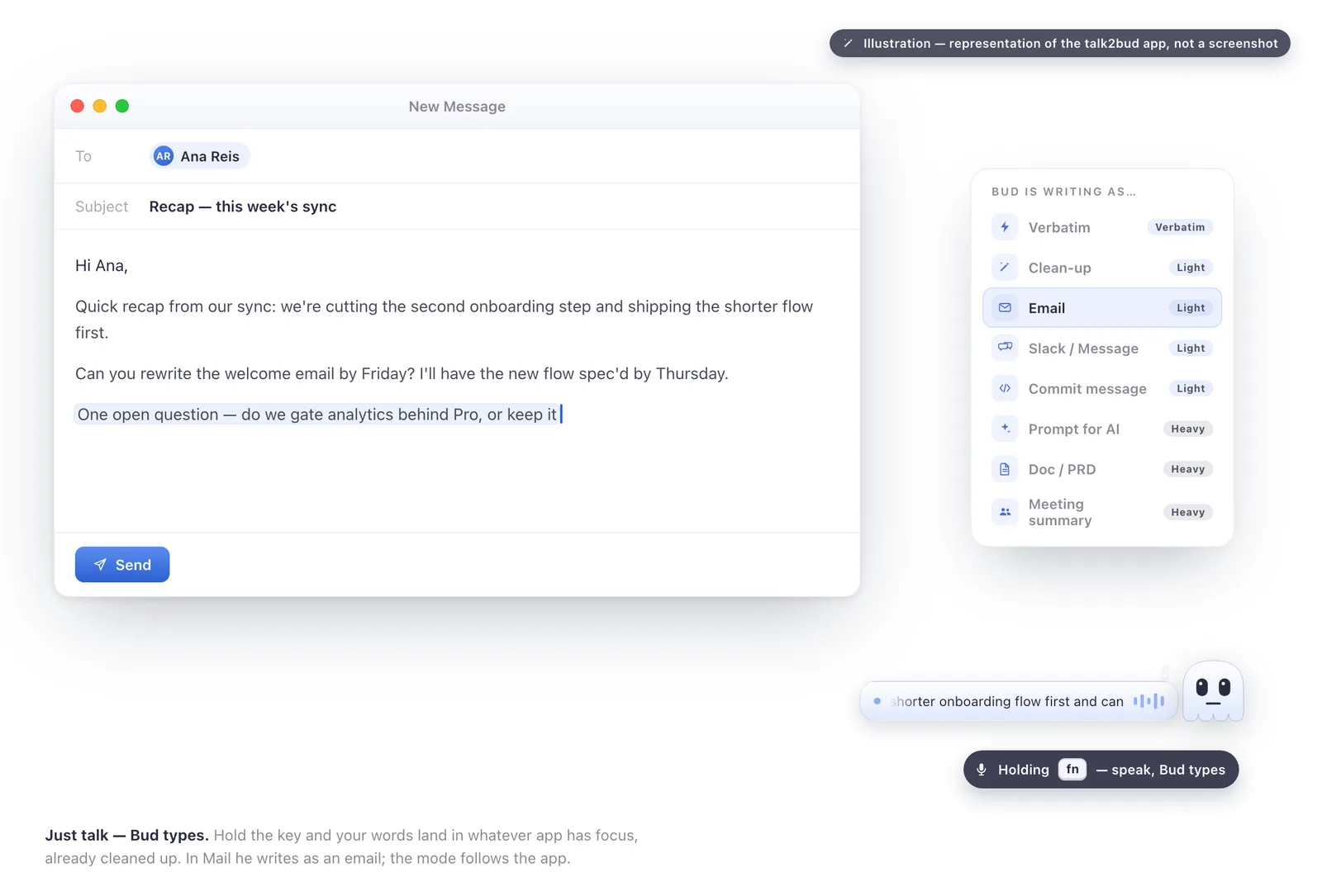
Illustration of the talk2bud app, not a screenshot: held-key dictation dropping finished text into the app you are already in.
Here is the difference, in an illustrative before and after (an example to show the mode, not a measured benchmark). A plain speech-to-text box hands you the raw stream:
hey sarah just following up on the call um can you send over the q3 numbers when you get a sec thanks
The enhancer, in email mode, hands you the artifact:
Hi Sarah, following up on our call. Please send the Q3 numbers over when you have a moment. Thanks.
The second leg of this is what keeps it from being one more single-purpose dictation app. The same tool captures your calls. When a meeting starts, talk2bud records it from your Mac's system audio with no bot joining the room, on an explicit consent flow rather than a silent participant in the corner. You point a Lens at the call, a small analysis playbook for that meeting type, and at the end the app reads the transcript against the Lens and returns the analysis. Dictation and meeting capture live in one app, so you are not paying for a voice-typing tool and a notetaker and reconciling two exports.
The limits are stated as the focus they are, not buried. talk2bud is Mac-only and English-only for now, and unlike SpeechTexter's free web app it is paid software, so what talk2bud costs is a real part of the decision. Those are the edges of a tool built to capture the conversation on a Mac and put the words where you need them, and they are the reason the next section names where SpeechTexter or another tool is the better call.
Alternatives, By Why You're Leaving
The right replacement turns on the reason you are walking away, not on a ranking.
Leaving for high-volume Windows dictation: Dragon (Nuance) is still the heavyweight, with system-wide control and strong accuracy once you train it. It costs real money and real setup time, which is the trade. talk2bud does not run on Windows at all, so this one is not close.
Leaving for free, offline, local recognition: on a Mac, tools like VoiceInk or Superwhisper keep recognition on the device, so the audio never leaves your machine, and they answer the privacy concern the section above raises without a subscription.
Leaving because you are on a Mac and tired of copying out of a browser tab: this is the case talk2bud was built for, and for the output problem it is the first alternative to try. Its dictation lands finished text in the app you already have open, and it keeps meeting transcription in the same place, so one tool covers the two jobs SpeechTexter and a notetaker would split. If you need Windows, another interface language, or free, SpeechTexter or Dragon is the better call, and this review will not pretend otherwise. If you are weighing dictation against a full note-taking setup, the honest comparison of the major note apps sorts that separately.
SpeechTexter, Scored By Criterion
Scores are 1 to 5, read against the sources in the methodology box. No row reads 5, because a free browser tool spends its depth to buy its reach, on purpose.
| Criterion | Score (1-5) | Why |
|---|---|---|
| Price | 5 | Free web app, no tier to buy |
| Setup speed | 5 | Seconds; no install, no account |
| Language range | 4 | 70+ languages and dialects |
| Accuracy (clear English) | 3 | About 90 to 95% in a quiet room, drops with accents and noise |
| Works across your apps | 1 | Types into its own box only; copy-paste to anywhere else |
| Offline and privacy | 1 | Needs the network; audio streams to Google |
| Output usability | 2 | Raw text; formatting and proper nouns need a cleanup pass |
FAQ
Is SpeechTexter free?
Yes. SpeechTexter's web app is free with no paid tier, and its Android app is free and ad-supported. Business directories that list its pricing "on request" are applying a generic template; there is no plan to buy. As of August 2026, SpeechTexter has no paid plan at any level.
Is SpeechTexter safe?
SpeechTexter is safe in the malware sense, since there is nothing to install and no account to create, and it says it stores no copy of your transcribed text server-side. It is not private in the way many people assume, though: because it uses the browser's Google-based engine, your spoken words travel to a remote server to be turned into text, as Mozilla's Web Speech API documentation spells out. For sensitive dictation, a local Mac tool that keeps the audio on the device is the safer choice.
Is SpeechTexter accurate?
SpeechTexter reaches roughly low-to-mid 90s percent accuracy for clearly spoken English in a quiet room with a good microphone. Accuracy drops with strong accents, background noise, and proper nouns, because the underlying Google engine does not learn from your corrections. Users on Capterra also report formatting quirks like extra spaces and stray capitalization that need a cleanup pass (verified August 2026).
Does SpeechTexter work offline?
No. SpeechTexter needs an internet connection because recognition happens on a server, not on your device. A weak or dropped connection returns a "Network error" and no text is typed. If offline dictation matters, a local tool such as VoiceInk or Superwhisper on a Mac keeps working without a connection.
Does SpeechTexter work on iPhone?
No. SpeechTexter does not support iPhone or iPad, and there is no native iOS app; on the desktop it runs in Chrome only, with a handful of Chromium-based browsers supported on Android. Apple users who want voice typing across their apps need a native option instead.
SpeechTexter works the moment you open it, and then one small question shows up and never leaves: the paragraph is sitting in a browser tab, and the message, ticket, or doc you needed it in is somewhere else. How does the text get out of the tab and into the app you actually write in? On a Mac, closing that gap is the entire design goal of talk2bud's dictation, where the words arrive as finished text in whatever app has focus and the same app captures your calls without a bot in the room, still on a consent step you say out loud rather than a recording nobody agreed to. If deleting the copy-and-paste step is the thing you actually want, that is the one next step to take.