Is The Fireflies Note Taker Worth Letting A Bot In?
The archive is real. So is the guest in your participant list, the storage meter, and the credits that renew whether or not you spent them. Verified August 2026.
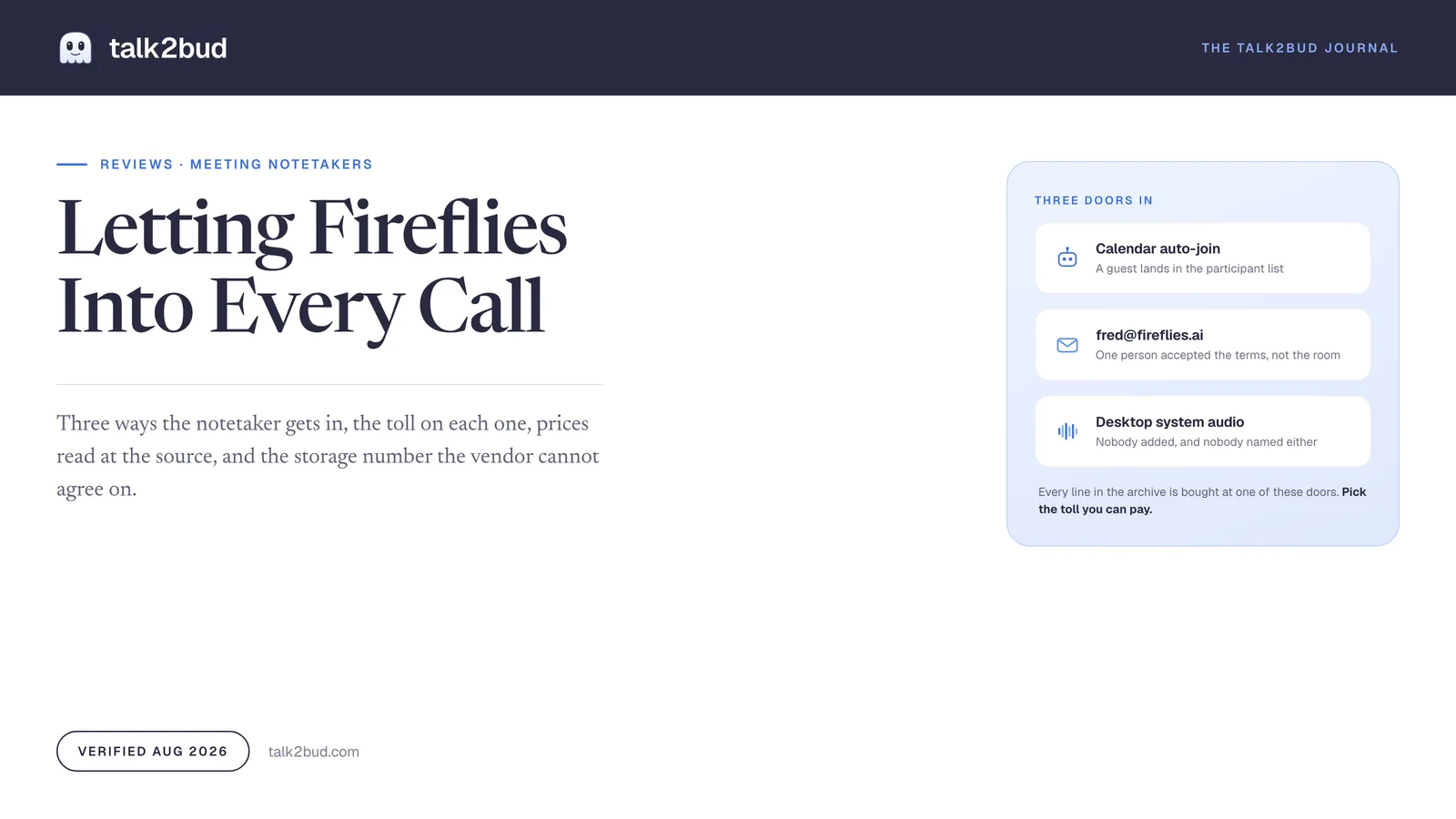
The Fireflies note taker buys you an archive, and it charges at the door. Either a bot joins your call as a visible participant, or the desktop app records from your machine and hands back a transcript where everyone is Speaker 1. Pick the toll before you pick the plan.
Who it's for: teams on Zoom, Meet, Teams or Webex who run enough calls that "what did we agree in March" is a live question, who want a CRM filled without typing, and who are fine with a named guest in the attendee list.
Who it isn't for: anyone whose calls are one to one, clinical, legal, or a job interview; anyone in an all-party-consent state who would rather not run a consent script for a third-party bot; and anyone on a Mac who would sooner capture the conversation without adding an attendee at all.
How this was verified. Read in August 2026 against Fireflies' own pricing page, its help center articles on joining, consent and bot-free recording, its privacy and security pages, a National Law Review survey of notetaker litigation published August 12, 2026, and dated public reviews on Capterra and Microsoft Q&A. Documentary research, every source linked in place.
Three Doors Into Your Call, And The Toll On Each One
Everything this product sells sits downstream of one mechanical question, which is how it hears the meeting at all. There are three answers, and they charge in different currencies.
It rides your calendar. Switch on auto-join and the assistant walks into every meeting on your schedule. The documentation is plain about what other people see: the bot "appears as Fireflies.ai Notetaker and may request permission if you're not the host," and it waits in the lobby for "up to 10 minutes for google meet and 15 minutes for other platforms" (how Fireflies joins meetings, accessed August 2026). The toll is a row in the participant list that nobody hired.
Someone invites it by email. Add fred@fireflies.ai to a Google or Outlook invite and the notetaker joins that call, including calls the host never showed up for. One person on that invite accepted the terms of service; the other eight did not.
It records from your computer instead. Since the desktop app launched on November 13, 2025, Fireflies also captures system audio on Mac and Windows: "No bot joins your call. No one sees an extra participant. No permissions prompt mid-meeting." Most write-ups skip this door, and it charges the steepest toll of the three.
The first two doors generate the support threads. On Microsoft's Q&A forum, an admin wrote that the assistant kept turning up anyway: "Despite removing the bot from the app, it continues to automatically join my meetings and webinars as a participant, which I am unable to prevent" (Microsoft Q&A, January 22, 2025). Support's remedy was for each user to delete their Fireflies account.
A meeting assistant is a capture design before it is a feature list, which is why talk2bud builds only the third door: on a Mac it pulls the online call from system audio, so nothing joins the room as a guest. Capturing without a bot is not capturing in secret. It stays honest only if you still tell the room and get the go-ahead, and the consent step is explicit in the app for that reason.
Where The Fireflies Note Taker Earns Its Keep
The archive is the product, and it works. Recordings become transcripts, transcripts become summaries with action items, and the history is searchable to the sentence and the timestamp, with AskFred answering questions across meetings you barely remember attending. Around that sit soundbites, talk-time analytics and roughly 200 integrations, including the CRM autofill that sales teams buy this category for.
Public ratings back the basics: 4.9 from 735 reviews on Capterra, 4.8 from about 4,700 iOS ratings, 4.5 across 190 ratings on the Chrome extension, all checked August 2026. The praise lands on one note, which is that people stop thinking about it. "Just press record and then forget it," one iOS reviewer wrote, "when the meeting is done you get a perfect summary" (Matty Matt, App Store, October 10, 2025). The advertised "95% Accurate" and "100+ Languages" are vendor claims, not independent measurements.
One point earns credit that rivals do not. The privacy policy states that "we do not use personal information for AI model training and we contractually prohibit our vendors from using this information for their own model training," and the security page advertises a 0-day retention option beside SOC 2 Type II, GDPR and a HIPAA business associate agreement on Enterprise. Set that beside the policy language in our review of Otter.ai, where training on de-identified audio and on transcriptions is spelled out as routine.
Seats, Storage, And Credits That Renew Without You
Prices come from the Fireflies pricing page and the company's own pricing post of July 10, 2026, verified August 2026.
| Plan | Sticker (annual) | Month to month | Real cost per seat, per year | The catch |
|---|---|---|---|---|
| Free | $0 | $0 | $0 | "400 mins of storage/team" and 20 one-time AI credits; transcript downloads need a paid plan |
| Pro | $10/seat/mo billed annually | $18/seat/mo | $120 annual, $216 monthly | "8,000 mins of storage/seat"; the desktop app starts here |
| Business | $19 per seat, annual billing | $29/seat/mo | $228 annual, $348 monthly | Unlimited storage, charged per seat; ten people pay $2,280 a year |
| Enterprise | $39 per seat, annual only | not offered | $468 annual | HIPAA agreement, private storage and SSO live behind this tier |
The advertised low number is the annual number. Fireflies promises "up to 44%" off on yearly billing, which is the same fact from the other end: on Pro, month to month costs $18 rather than $10.
Credits are the part that surprises finance. Transcription, recap emails and template-based summaries do not consume them; AI Skills, custom summary sections, magic and keyword soundbites, Sales Assist, CRM autofill and AskFred on Live Assist do. Each plan ships starting credits, 20 on Free and Pro, 30 on Business, 50 on Enterprise, and those "are one-time and do not expire." Buy more and the terms invert: bundles run from 50 credits at $5 to 10,000 at $600, they "auto-renew monthly unless paused," and "unused purchased credits do not carry over to the next billing cycle" (Fireflies on AI credits, accessed August 2026).
Budget it the way a controller would: seats, times twelve, plus a credit subscription that bills again whether or not last month's went unspent. For the Mac alternative here, what talk2bud costs is one line covering the calls and the dictation, rather than a notetaker bill next to a voice-typing bill.
The Free Plan Has Two Storage Numbers
Fireflies disagrees with Fireflies about the size of its own free tier, and the gap is a factor of two. The pricing page and the July 2026 pricing post both say "400 mins of storage/team." The help center article on the free plan says "You get 800 minutes of storage per seat" and tells you to "delete older files to store new ones" at the ceiling. Both pages are first-party, both read on the same day.
A Capterra review settles which number the software enforces. "I signed up for a free account," wrote a VP of innovation at a marketing firm, "after I hit 500 minutes, I was told I was over my limit and I then noticed my account had a 400 minute limit" (Sarah P., Capterra, June 4, 2026).
Plan against 400 minutes and treat the free tier as a demo rather than a filing cabinet. Roughly seven hours of meetings fills it, and the way to empty it is to throw away the meetings you kept it for.
What Buyers Report After The First Quarter
Three complaints repeat in dated public reviews, and none is about the summaries.
Accents cost accuracy. Transcription "can miss or slightly misinterpret certain words, especially when there are strong accents, background noise, or multiple people talking at once," wrote an IT presales reviewer (Muhammad Aqeef Rusydan M., Capterra, April 13, 2026).
The archive gets harder to mine as it grows. A non-profit president with hundreds of meetings stored reported that the "search feature requires fairly specific keywords to surface the right recording" (Lindsey T., Capterra, February 19, 2026). Search is the reason to keep an archive, so friction there hits the core promise.
Integration depth stops short of the long tail. "CRM integration is limited," a training company chief executive wrote. "As a Pipedrive user, I'd welcome a deeper native connection" (Joe G., Capterra, May 27, 2026). The 200-integration count is real; Salesforce and HubSpot got the engineering.
Consent Ships Switched To Opt-Out
In the default opt-out mode, "the bot joins automatically" and "participants must remove the bot or reject recording if they don't agree." Attendees get a pinned chat notice, an opt-out link in the advance email, and the commands /ff pause, /ff resume and /ff leave on Google Meet, Teams and Zoom. An opt-in mode exists on Zoom, the Google Meet SDK and Microsoft Teams, where five people in a call means all five must approve and one No stops the recording (recording consent controls, accessed August 2026). An administrator has to switch that on. Out of the box, silence counts as yes.
Institutions noticed first. UW-Madison's help desk warns staff about "an increase in uninvited third-party AI assistant bots discreetly joining their meetings," and admits its account-wide block "is not consistently blocking recently configured third-party AI assistant bots" (UW-Madison, updated April 9, 2025).
Courts are on the same question. Two Illinois Biometric Information Privacy Act suits name the company, Cruz v. Fireflies.AI Corp., No. 3:25-cv-03399 (C.D. Ill., filed December 18, 2025) and Parrinello v. Fireflies.AI Corp., No. 3:26-cv-02479 (N.D. Cal.), alleging it stored voiceprints of participants who never gave written consent. A National Law Review survey published August 12, 2026 groups them with the Otter.ai and Granola cases: "all three cases target the same fundamental design choice: capturing the communications of non-consenting participants" (National Law Review). These are allegations, undecided.
None of that makes Fireflies a rogue product. It makes consent your job rather than the tool's, and in the twelve states that require every party to agree, the job carries legal weight. Our plain-English guide to which states require everyone on a call to agree before you record covers where your meetings sit.
The Bot-Free Mode, And What Leaves With The Bot
The documentation on the third door is honest about the exchange rate. In system audio mode, Fireflies "captures system audio and generates a transcript and summary once the meeting ends," and it "does not save separate audio or video files." Nobody appears in the roster.
Two things leave alongside the bot. First, speaker identification: with no participant in the call, transcripts come back tagged "Speaker 1 / Speaker 2," so the archive keeps what was said and loses who said it. Second, the automatic notice, which in this mode is "currently available only for Microsoft Teams Business accounts" (recording without a bot, accessed August 2026). Everywhere else, telling the room is a sentence you say yourself, which is the honest version anyway. You also cannot switch to the bot mid-meeting, and the desktop app requires Pro or above.
The value of an archive is attribution, because "who committed to this" is the question you go back for. Fireflies protects attribution by putting a guest in the room, and its own bot-free path buys privacy by spending the exact thing that made the archive worth keeping.
Scored On The Things That Decide This
Scores run 1 to 5, against the sources linked above, and neither product scores 5 down the column.
| What decides | Fireflies | talk2bud | Reading |
|---|---|---|---|
| Platforms and devices covered | 5 | 2 | Zoom, Meet, Teams, Webex, web, iOS and Android against a Mac app for Apple Silicon |
| Languages | 5 | 2 | "100+ Languages" claimed against English only |
| Nothing added to the participant list | 2 | 5 | The Fireflies default is a bot with an opt-out; talk2bud adds no attendee, and you still say the line to the room |
| Who owns what, with nobody added | 1 | 4 | System audio mode labels every line Speaker 1; talk2bud reads the call against a Lens and returns action items with an owner and a date |
| One subscription for calls and dictation | 2 | 5 | Fireflies does meetings; typing by voice into the app in front of you is a second tool and a second bill |
| Analysis you can steer per meeting type | 3 | 5 | AI Skills and custom summaries work, and they burn credits; Lenses are picked or written by you |
| CRM and workflow integrations | 5 | 1 | Salesforce, HubSpot and roughly 200 more against a product that makes no such claim |
| A free tier | 4 | 1 | Fireflies runs free inside a storage bucket; talk2bud is paid software with a trial |
The Same Client Call, With Nobody Added To It
talk2bud is built around the third door and only that one. It is a Mac app for Apple Silicon, in English, recording the online call from your machine's system audio, so nothing lands in the Zoom or Meet roster and nobody admits a bot from a lobby. No hidden guest is not the same as recording behind someone's back, so you still tell the room and get agreement, and the app treats consent as an explicit step rather than a checkbox nobody reads.
After the call you point a Lens at it, a small analysis playbook for that meeting type, a sales call, a 1:1, a client discovery, an interview, or one you write from the playbook your team already runs. talk2bud reads the transcript against that Lens and returns the analysis, action items carrying an owner and a deadline, instead of a recap you still have to mine for the decision.
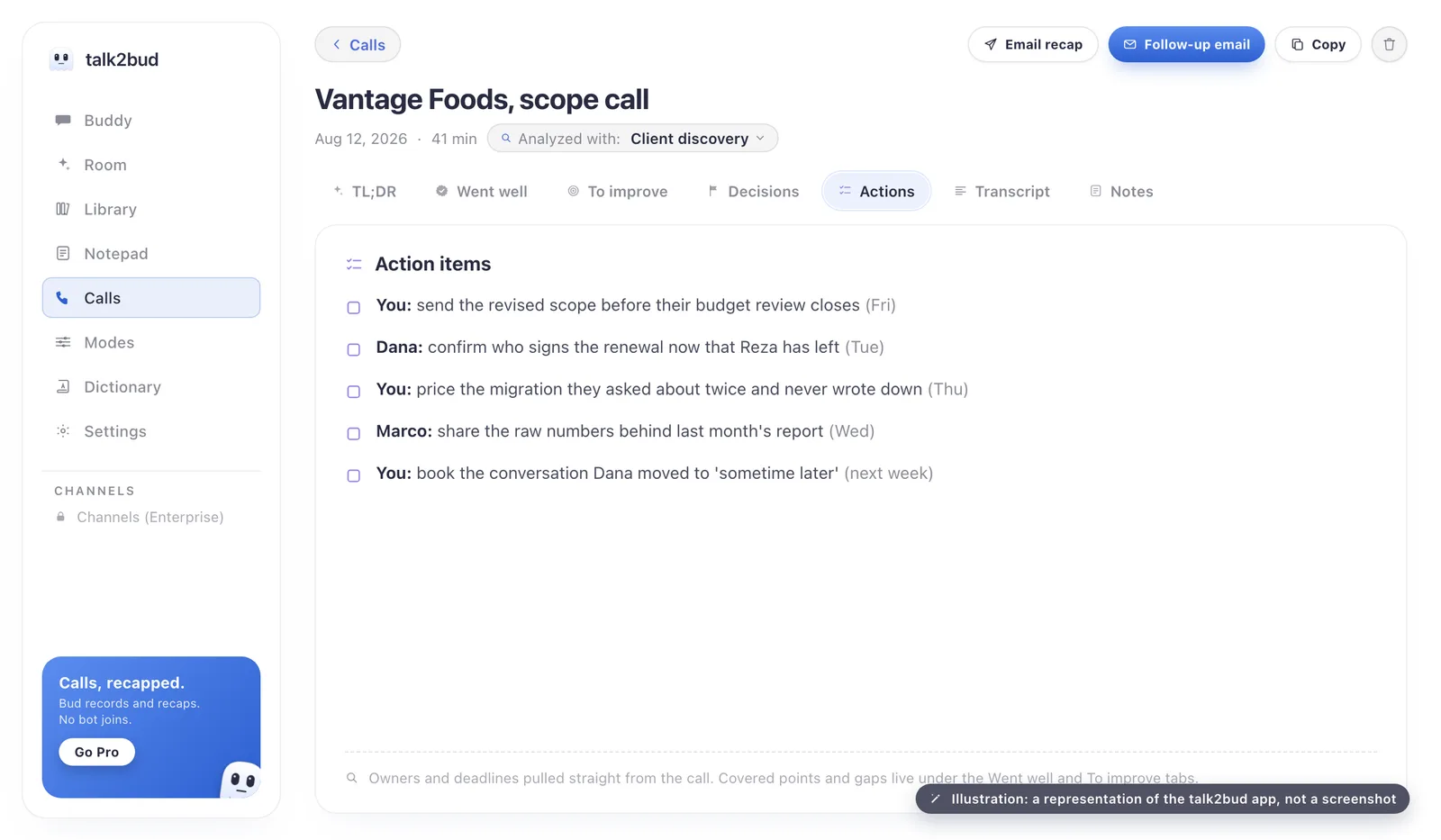
Two details matter for the readers this review is written for. A 1:1 stays with the two people in it and is not pushed to a team channel by default, the opposite of an archive that defaults to shared. And dictation lives in the same app, so speaking a finished message into whatever window has focus and capturing a meeting are one purchase. The limits are the focus: Mac only, English only, paid, built to capture the conversation rather than to blanket every platform in the building.
Where Fireflies Is The Better Buy
Some teams should read this review and buy Fireflies.
Run Windows, or half the team does, and talk2bud is not an option at all. Sell through Salesforce or HubSpot and want call notes landing in the record untouched by a human, and Fireflies Business is the shorter path, credit meter included. Work across languages, or need a phone on a table capturing an in-person conversation, and the coverage gap is not close. Then there is attribution: if a labeled transcript with names against every line is the deliverable, a guest in the room is the mechanism that produces it, and both Fireflies and Otter.ai do that job well.
Pick By The Shape Of Your Week
Sort by how you work, not by a ranking.
Sales team on Windows, CRM first. Fireflies Business, with the credit bundle budgeted rather than discovered halfway through a quarter.
Solo consultant or founder on a Mac, client calls all day. talk2bud. The calls stay off a guest's roster, consent is said out loud, and one subscription covers the dictation too.
Recruiter or hiring manager running interviews. Skip the bot the candidate has to accept. Capture without adding an attendee, say what is being recorded before the first question, and keep the analysis with the panel.
Regulated team in an all-party-consent state. Fireflies Enterprise, if the HIPAA agreement and private storage are requirements, with opt-in recording switched on.
Budget of zero. The Fireflies free plan, 400-minute caveat and all. The full field, sorted by the reason people leave the tool they have, sits in our comparisons of meeting tools by why people switch.
Your Questions, Answered
Is Fireflies.ai worth it?
Fireflies.ai is worth it for teams that need a searchable archive of every call and accept one of two tolls: a bot in the participant list, or the desktop app's system audio mode, which drops speaker labels. It fits badly around one-to-one, clinical, legal or interview conversations, where a third-party guest is the problem rather than the transcript. Verified August 2026, the decision turns on consent and on the credit budget.
Is Fireflies.ai free?
Fireflies.ai has a free plan at $0 with unlimited transcription and 20 one-time AI credits, but storage is capped and the company's own pages disagree on the cap: the pricing page says 400 minutes across the team, the help center says 800 per seat, both read August 2026. A Capterra review from June 2026 describes an account cut off at 400. Paid tiers start at $10 per seat monthly on annual billing, or $18 without the yearly commitment.
Does Fireflies record without permission?
Fireflies runs opt-out by default, so the bot "joins automatically" and the burden falls on attendees to remove it or refuse, with a pinned chat notice instead of an approval prompt. An opt-in mode on Zoom, Google Meet and Microsoft Teams requires everyone to approve first, but an administrator must switch it on. Two Illinois biometric-privacy class actions against Fireflies.AI Corp. allege it captured people who never consented, and those claims are unproven.
How do I remove the Fireflies notetaker from a meeting?
In a live meeting, type /ff leave in the chat to remove the Fireflies bot or /ff pause to stop it recording, and a host can eject it like any other participant. To stop it coming back, switch off auto-join in the Fireflies dashboard and delete fred@fireflies.ai from the calendar invite. Microsoft Teams administrators can block the app in the Teams admin center.
Is Fireflies.ai safe to use?
Fireflies.ai holds SOC 2 Type II and GDPR compliance, encrypts data with 256-bit AES, offers a HIPAA agreement on its top tier, and says in its privacy policy that customer personal information is not used to train its models. Security is solid; consent is the live exposure, because the notetaker's default is to join and record everyone present. In all-party-consent states, getting that agreement is your job, whatever certifications the vendor holds.
If your calls run on a Mac and the guest in the participant list is the part that bothers you, the single next step is to capture your next meeting with talk2bud's call capture, tell the room you are recording, and read the Lens analysis against the notes you would have typed by hand.